Checkout, Delivery and the Order Record Explained
An order here runs through four stages: payment, account details, the Order Record, and a confirmation email when it closes. Genshin Impact orders carry a published window of 5–30 minutes after payment, and the live chat beside the order is staffed 24/7. This walkthrough follows the flow from checkout to the email, with the timing worked out step by step.

Key takeaways
- The order form asks for the account credentials and the server, so have both in front of you before you pay.
- The Order Record keeps the status visible after checkout, and a confirmation email follows when the order completes.
- Published windows: Genshin Impact 5–30 minutes, Arknights: Endfield 15–30 minutes, Whiteout Survival usually 10–30 minutes.
- One active session per account is allowed, so run one order at a time rather than queuing several.
The four stages of an order
Stage one is the choice and the payment. You pick a tier from the game's page, and the checkout takes the payment over an encrypted channel with antifraud monitoring running behind it. The site lists credit and debit cards, e-wallets and, in many regions, local payment methods; the amount on the page is in US dollars, and if your card is billed in another currency your bank may add a conversion fee of its own.
Stage two is the detail exchange. Account login top-up needs the login email and password for your HoYoverse Account and the server your character sits on — America, Europe, Asia or TW-HK-MO. The pages ask you to stay logged out while the work happens, because one active session per account is enforced: a session running on your device can push the provider out, and the top-up then fails. If you have two-step verification, keep the code reachable and send it only through the order chat.
Stage three is delivery inside the account, where the item is purchased in the in-game shop on your behalf. Stage four is the closing paperwork: the status in the Order Record and a confirmation email when the order completes. Once it closes, the page states that the provider signs out and clears the login history on its side — and it advises changing your password afterwards as routine hygiene.
What the Order Record is for
The Order Record is the running log of your purchases, and the pages describe it as visible at any time rather than only at checkout. That matters for two situations. The first is a slow queue: during the opening hours of a banner the window can run to the slow end, and a status line saves you guessing. The second is a repeat purchase — the record shows what you bought last time, which is useful when you want the same tier again without hunting through the page.
Keep the confirmation email alongside it. Together the record and the email give you a dated trail, and if anything is wrong the published promise is worth quoting exactly: if an order is not delivered or cannot be used, you receive a full refund.
Delivery windows, as published
The three windows below are printed on the individual game pages. They are the ones to plan around; nothing shorter should be assumed.
| Game | Window after payment | Condition attached to it |
|---|---|---|
| Genshin Impact | 5–30 minutes | Support 24/7; slower queues in the first hours of a new banner |
| Arknights: Endfield | 15–30 minutes | Stay logged out while the order is processed |
| Whiteout Survival | Usually 10–30 minutes | Timed from the moment the order details are in |
| Wuthering Waves | Faster with an email-linked Kuro Games account | The character name must be double-checked |
Read the third column as part of the deal rather than as fine print. A window starts when the details are complete, so a missing server, a mistyped nickname or an active session pushes the clock back.
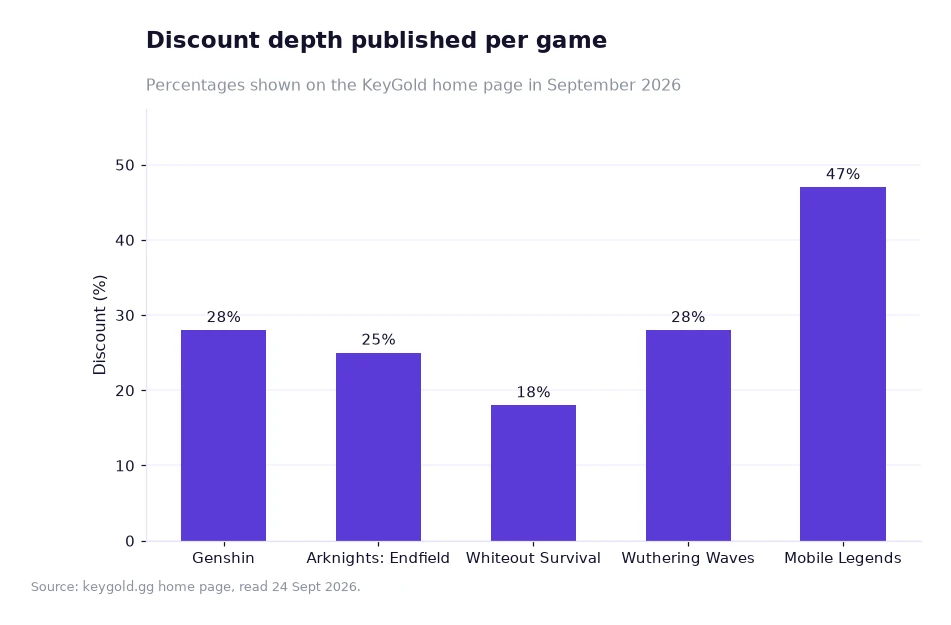
How the checkouts differ in depth
The chart above is the home page's discount table in bar form, and it explains why the timing questions differ from game to game. Genshin Impact and Wuthering Waves are both listed at 28%, Arknights: Endfield at 25%, Whiteout Survival at 18%, and Mobile Legends: Bang Bang at 47%. The percentages are published as shown, and they sit beside the two price columns on each page.
A deeper cut in the table does not mean a faster window, and a shallower one does not mean a slower window. Whiteout Survival carries 18% and usually lands in 10–30 minutes; Arknights: Endfield carries 25% over 15–30 minutes. Treat the chart as a map of what each catalogue saves, and the table above as the map of how long each one takes.
Worked example: timing an evening order
Say you finish work at 21:30 and want the order closed before you go to bed. The inputs are the published window for Genshin Impact, 5–30 minutes, and my own assumption that you start at 21:40; the arithmetic is mine, not a promise from the store.
Fast end: 21:40 plus 5 minutes is 21:45. Slow end: 21:40 plus 30 minutes is 22:10. So the realistic band is 21:45 to 22:10, and there is no cut-off hour to worry about because the chat runs around the clock. If nothing has arrived by 22:10, the sensible next step is the chat rather than a second purchase.
Now the counter-example. Suppose you want two orders on the same account that evening. With one active session per account, the second order waits for the first to finish, so the worst case is 30 + 30 = 60 minutes on top of the 21:40 start, which is 22:40. On the Endfield page the window is 15–30 minutes, so a single order at 21:40 lands between 21:55 and 22:10; two back to back could reach 22:40 there as well. If your evening is tight, one order is the arithmetic to trust.
For a Whiteout Survival order the window is usually 10–30 minutes once the details are in, so the same 21:40 start gives 21:50 in the best case and 22:10 in the slow case. Different windows, same discipline: start early, leave the session closed, and read the record instead of refreshing the game.
Frequently asked questions
Where do I see whether the order has been delivered?
The Order Record holds the status and stays visible at any time, and a confirmation email follows once the order completes. The live chat runs 24/7 if the record has not moved.
Can I place two orders at once on one account?
No. One active session per account is allowed, so a second order waits. Finish the first, then start the next one.
If the window passes without a delivery
Open the Order Record first and read the status line; that tells you whether the order is still running or has closed. Then open live chat with the order number, the game and the tier you bought — a real person is there at any hour, before and after the purchase. If nothing is delivered and nothing is usable, the published Full Refund Guarantee applies.
When the order does close, change your password and keep two-step verification reachable. That is the routine the pages recommend, and it costs a minute. If you would rather compare tiers before buying anything, the games list shows what is on offer, the blog carries longer write-ups, and the Genshin page is where you cheap genshin top up once you have decided.
One last piece of discipline: register before the first order so the new-user coupon is in your account. It is published as one coupon, no threshold, valid for 30 days, and 9.3K people have claimed it. After that, the points programme on the home page carries the savings forward.
The windows, percentages and guarantees quoted above come from KeyGold's own pages, read 24 Sept 2026; the evening timings are the author's example arithmetic on those published windows.[1]